
Out of office
Set an away status with a delegate. Colleagues see a purple status and your note before they message you, and mail to your personal mailbox gets one automatic reply per sender.
Out of office (fjarvera) tells colleagues and customers that you are away, until when, and who answers for you in the meantime. It is a personal status: you set it once, and it shows in every workspace you are a member of. It ends by itself at the time you chose.
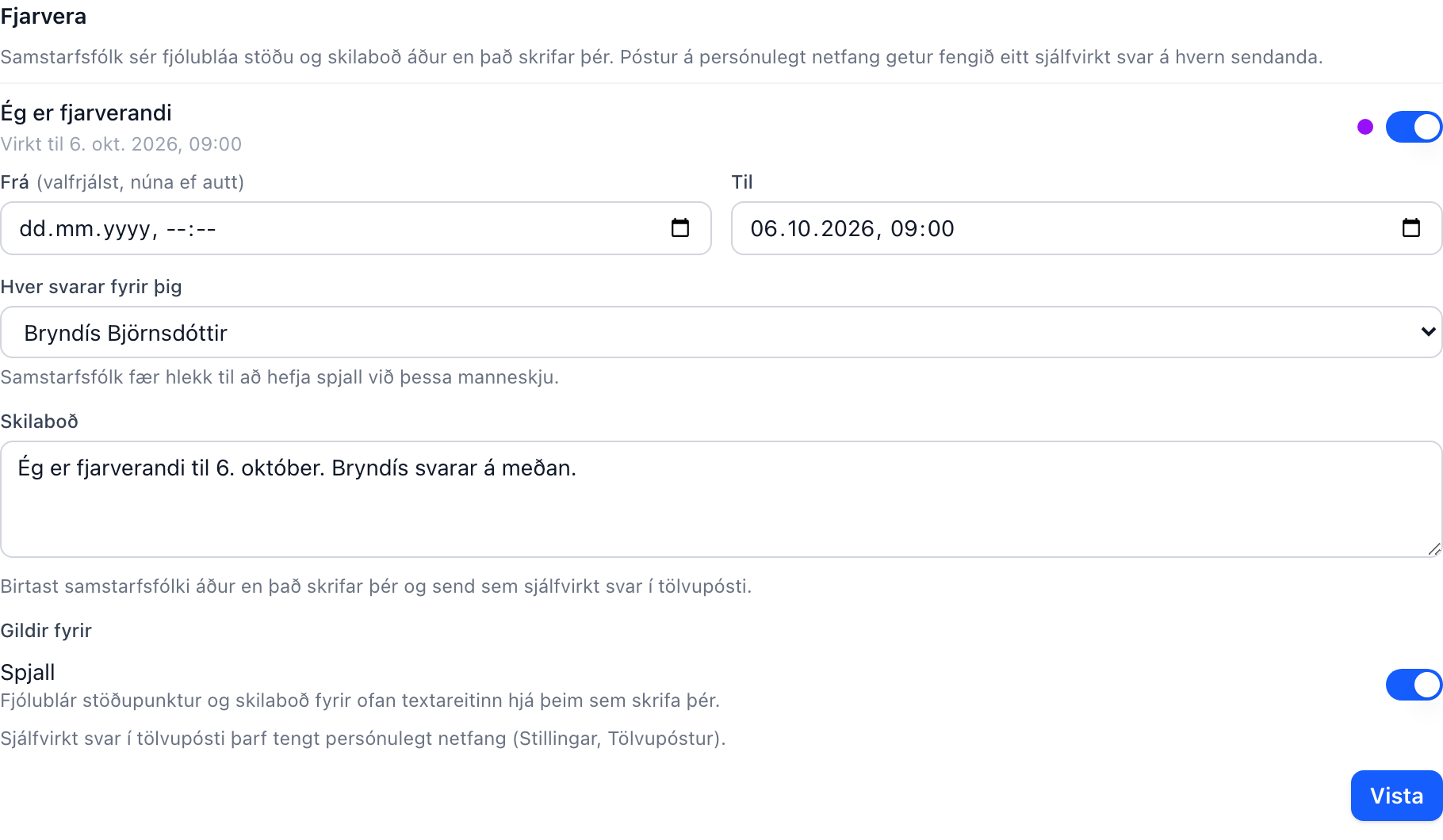
Turning it on
Open Stillingar → Valkostir and find the Fjarvera block. Switch on Ég er fjarverandi and fill in:
- Frá (optional) and Til. Leave Frá empty to start right away. The status switches off by itself at the Til time.
- Hver svarar fyrir þig: a colleague in your workspace. Colleagues get a one-click link to start a chat with this person, and the default message names them.
- Skilaboð: the note colleagues see, and the text of the automatic email reply. A default is filled in for you ("Ég er fjarverandi til 6. október. Bryndís svarar á meðan.") and you can rewrite it freely.
- Gildir fyrir: Spjall (the internal chat) and Tölvupóstur (your personal mailbox). You can turn on either or both. The email option only appears when you have connected a personal mailbox under Stillingar → Tölvupóstur.
Press Vista. To edit later, change the fields and save again.
What colleagues see in chat
With Spjall on, your presence dot turns purple everywhere it shows: the chat list, the new-chat picker, the team section, and message mentions. Purple means "away", regardless of whether you happen to be online.
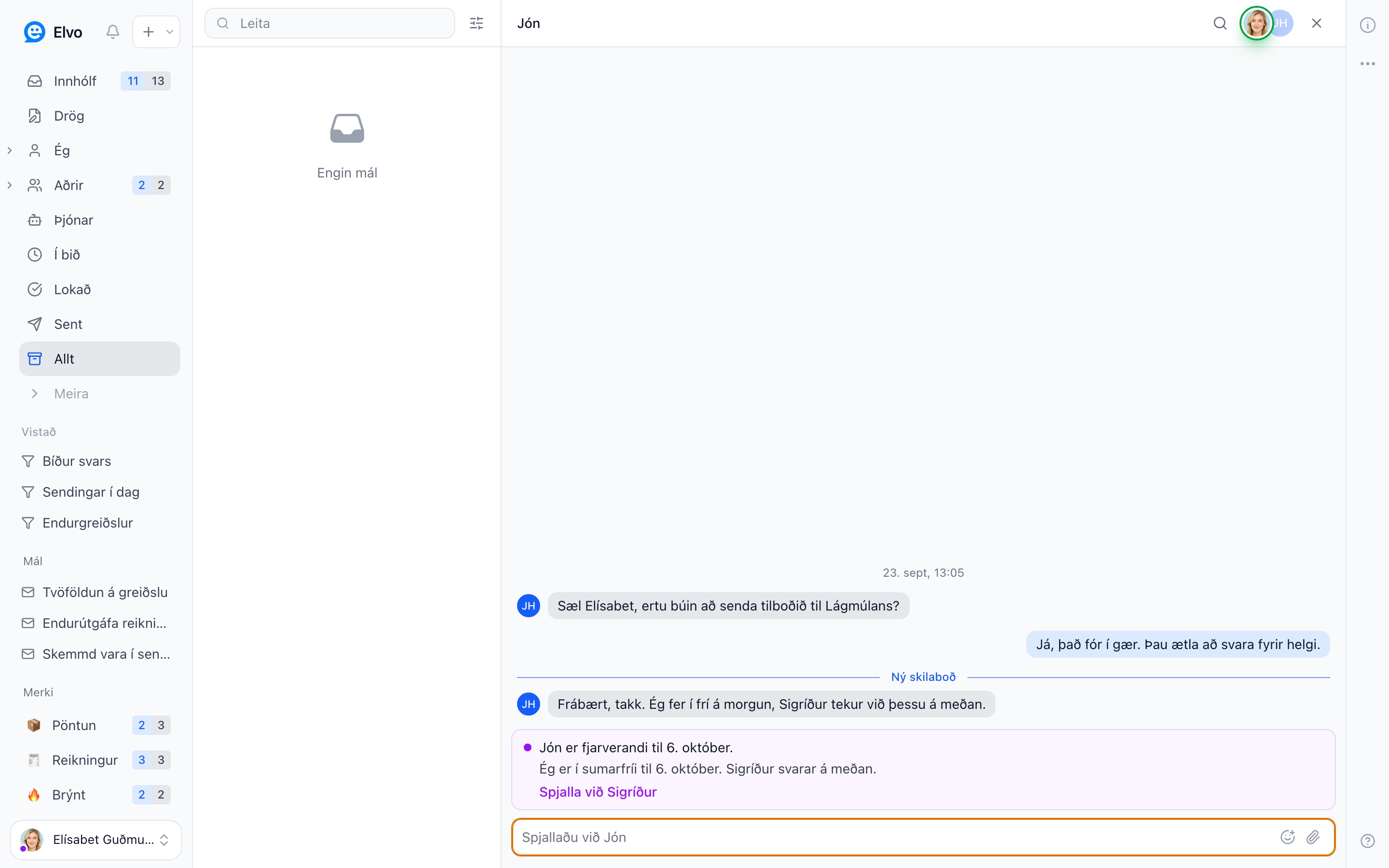
When a colleague opens a direct message or a group chat with you, a banner appears above the message box with your name, the date you are back, your note, and a Spjalla við … link that opens a chat with your delegate. Long notes are cut to one line and expand on click. In a group chat with several away members there is one line per person.
Nothing is sent automatically in chat. Colleagues can still write to you, and you still get your notifications as usual. The banner is a heads-up, not a wall.
Automatic email replies
With Tölvupóstur on, every email that arrives in your personal connected mailbox (Gmail or Microsoft 365) gets an automatic reply:
- It is sent from your own address and threads on the sender's message, so it looks like any other out-of-office reply.
- Each sender gets one reply per away period, no matter how many emails they send or how many cases those land in.
- The reply shows up in the case timeline as an automatic reply, so your team can see what went out.
- Automatic replies, newsletters, notifications, and no-reply senders never get one.
The reply goes out a few minutes after the email lands in Elvo, with the normal mailbox sync.
Shared and team mailboxes are not covered by your personal status. For those, use an automation rule with the auto-reply action.
Turning it off early
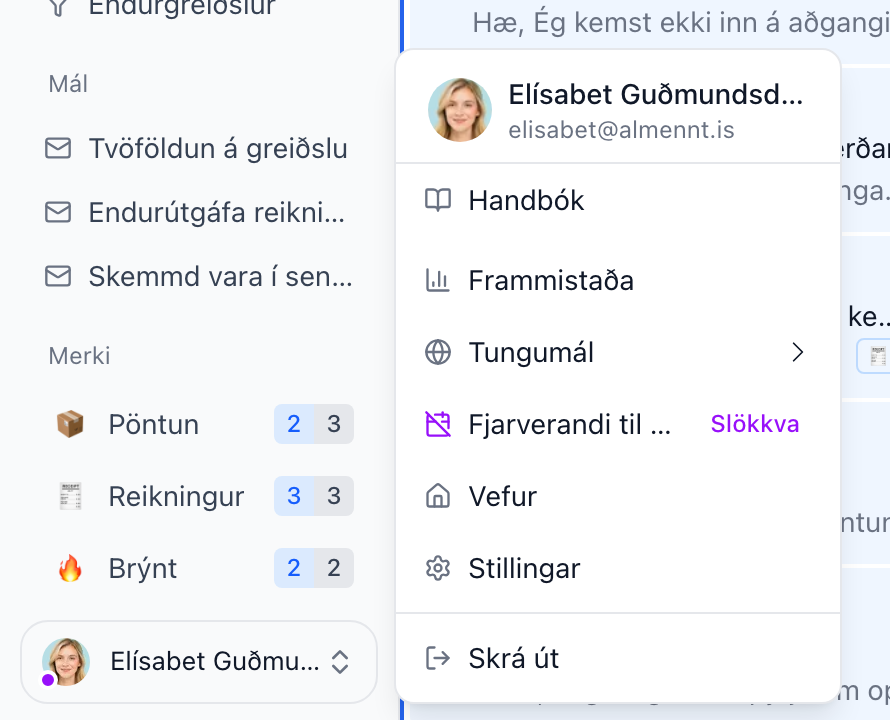
Open the profile menu at the bottom left of the sidebar. While the status is active it shows Fjarverandi til … with a Slökkva action that ends it at once. You can also switch off Ég er fjarverandi under Stillingar → Valkostir.
Via the API
The status is also available through the public API: GET, PUT, and DELETE
/api/public/v1/me/out-of-office read, set, and clear the status of the token's user, and each
user in /api/public/v1/users carries an out_of_office field while their status is active.
FAQ
Does the status change who gets assigned my cases? No. Assignment, notifications, and routing work exactly as before. The status is a signal to colleagues plus the email auto-reply.
Can a sender get two automatic replies? Only if you turn the status off and on again, or change the dates. That starts a new away period. Editing just the message or the delegate keeps the current period, so senders you have already answered are not answered again.
My delegate is in another workspace. Why is there no link? The chat link only appears in workspaces where the delegate is a member. Your note still shows.
Why is the email option missing? It only appears when you have connected a personal mailbox under Stillingar → Tölvupóstur. Shared mailboxes use automation rules instead.
Does it work in the customer chat widget? No. The widget follows your workspace's opening hours, not individual statuses.